Automatic document classification on upload
Drop your file, choose its type — Pristy creates the right folder and files the document. Effortlessly, accurately, without interrupting activity.
Espaces
Nouveauté
25.1
26.0
What is it for?
The Pristy Espaces classification plan is an automatic document structuring tool — it defines a folder hierarchy and document types on a workspace, and files each deposited document in the right place without manual intervention.
When a file is deposited, the user selects its type — Pristy automatically creates the right folder (if it does not yet exist) and moves the document there. The result: consistent organisation, readable even outside Pristy (WebDAV, FTPS, file explorer), without heavy technical constraints.
The plan is applied live to an existing workspace, without interrupting ongoing activity.
Drop it, choose the type. Pristy classifies.
How to use it?
An administrator configures the classification plan from the workspace settings: they define the permitted document types and the corresponding folder hierarchy. Once activated, users see the available types when depositing or creating any document.
The plan can evolve during the life of the workspace: a reclassification action allows existing documents to be reorganised if the structure changes.
When should you use it?
Wherever documentary rigour is essential: shared workspaces, user files, public procurement management, deliberation archives…
A few concrete examples:
- Local authority — Each deposited deliberation is automatically classified by type (planning, finance, HR…). No more catch-all folders.
- Legal department — A plan by contract type: service, lease, agreement. Pristy creates the right folder on deposit, with no manual intervention.
- Archivist / Records manager — The classification plan guarantees a hierarchy compliant with the archiving plan from the very first deposit, without depending on each user’s goodwill.
- IT / IS department — The plan applies live to existing workspaces. No heavy migration, no service interruption. The hierarchy remains consistent and navigable outside Pristy via WebDAV or FTPS.
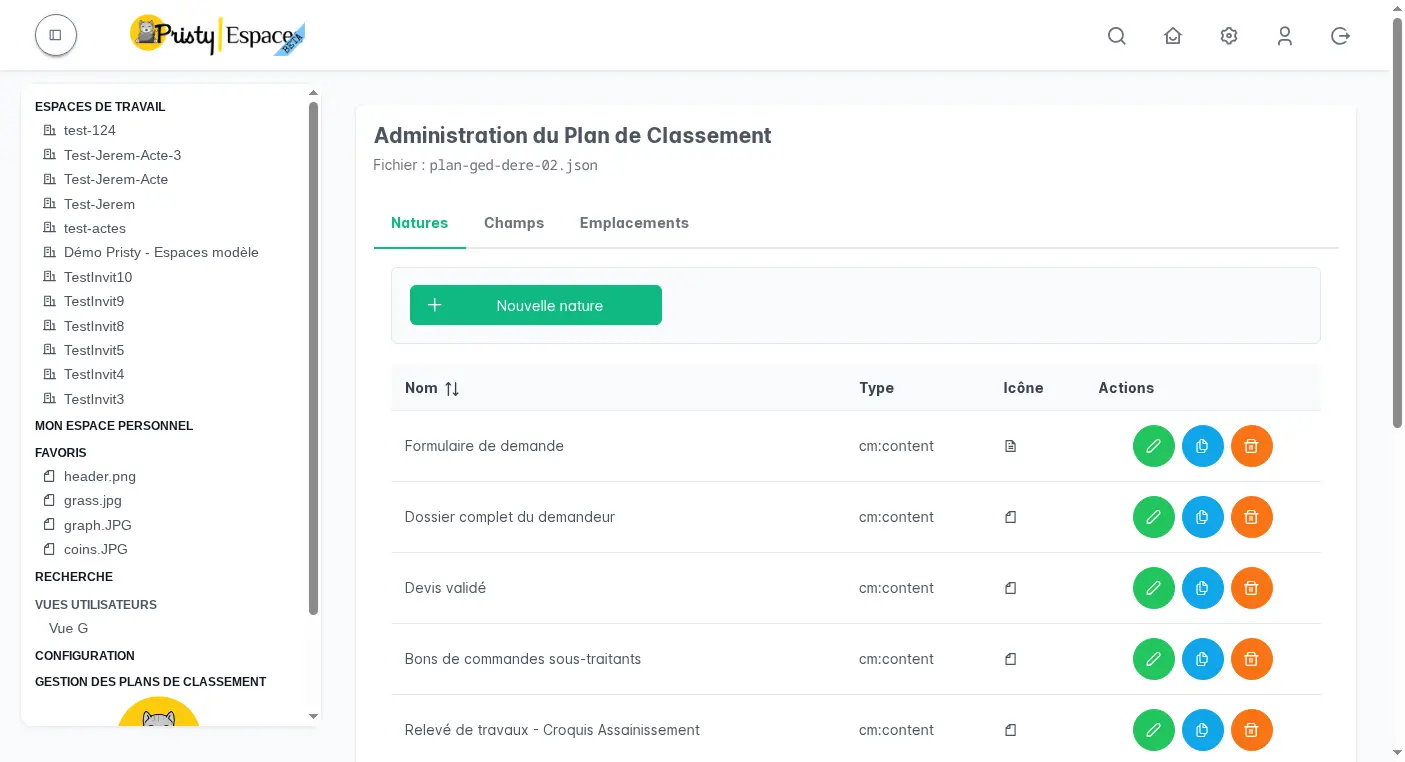
Reclassification after plan evolution (26.0)
When the plan evolves — new type added, hierarchy reorganised — existing documents may end up out of classification. From Pristy 26.0, a dedicated action identifies these documents and automatically repositions them according to the current rules, without manual intervention file by file.
The administrator launches reclassification from the space settings: Pristy analyses all documents, detects those that no longer match the current plan and moves them to the correct location.
How does it boost productivity?
No more misfiled or misnamed documents. The classification plan becomes a discreet guide, built into the workflow — the user chooses the type, Pristy does the rest.
For organisations managing large documentary volumes, it is also a reliability driver: the hierarchy is consistent by design, findable by everyone, and readable even outside Pristy. Less time wasted searching, fewer classification errors, fewer manual corrections.
Frequently asked questions
Can a plan be applied to a workspace that already contains documents?
Yes. The classification plan is applied live to an existing workspace, without interrupting activity. Documents already present remain in place — only new deposits are automatically classified. A reclassification action can then reorganise existing documents if needed.
What happens if the destination folder does not yet exist?
Pristy creates it automatically at the time of deposit. The user does not need to know the folder hierarchy — they choose the document type, Pristy handles the rest.
Is the folder hierarchy accessible outside Pristy?
Yes. Folders created by the classification plan are accessible via WebDAV, FTPS or any file explorer. The organisation remains consistent and navigable regardless of the tool used to access the documents.
Other recent features
- PDF consultation — Consultez vos pdfs facilement, qu'ils contiennent 2 ou 650 pages.
- Administration tools — Manage Alfresco data models, browse the repository and supervise your platform from Pristy Portail — no server access, no command line.
- Customisable dashboard — Access what matters most from the moment you log in with the customisable dashboard in Pristy Portail. Profile-based home pages, configurable blocks, personalised by each user.
- PDF editing tools — Edit your PDFs without leaving Pristy — reorder pages, redact, merge, sign. Directly from the viewer, versioned automatically.
Planned developments for this feature
There is always room for improvement! Here is what we have planned for the future of this feature:
- Further improvements to automatic classification
How to get Pristy
Order Pristy today and benefit from modern, intuitive document management
Pristy also includes Pristy Portal application that offers profile and user pages. Pristy Portail is included with the purchase of Pristy Actes and Pristy Espaces (solo or together). Pristy Portail can also be purchased on its own.
Go to our rates page to find out more. Request your quote now and take advantage of our low rates and the chance to give your opinion on future features!